
 Home
Homeபுதிய பதிவுகள்
» காங்கிரஸ் காஷ்மீரை சீனாவுக்கு ரகசியமக கொடுக்க நினைத்திருக்கின்றது?
by சிவா Today at 12:27 pm
» நாவல்கள் வேண்டும்
by M. Priya Today at 9:22 am
» சினிமா செய்திகள்
by ayyasamy ram Today at 8:31 am
» “மியாவ் மியாவ்” போதைப் பொருள்.. ரகசிய லேப்கள்.. குஜராத், ராஜஸ்தானில் ரூ. 300 கோடி “பவுடர்” வேட்டை!
by ayyasamy ram Today at 8:21 am
» கருத்துப்படம் 28/04/2024
by mohamed nizamudeen Today at 6:41 am
» மம்மூட்டி போல் பாலிவுட் ஹீரோக்கள் நடிக்க மாட்டார்கள்: வித்யா பாலன்
by ayyasamy ram Yesterday at 8:31 pm
» 2-ம் கட்ட லோக்சபா தேர்தல்.. கேரளா உள்பட 13 மாநிலங்களில் வாக்குப்பதிவு..
by ayyasamy ram Yesterday at 7:47 pm
» வாயாலேயே வடை சுடுற நண்பன்...!!
by ayyasamy ram Yesterday at 6:10 pm
» பஹத்துக்கு ஐஸ் வைத்த சமந்தா
by ayyasamy ram Yesterday at 2:07 pm
» அஜித் பிறந்தநாளில் பில்லா படம் ரீ-ரிலீஸ்
by ayyasamy ram Yesterday at 2:06 pm
» சஞ்சனா சிங்கின் ‘வேட்டைக்காரி’
by ayyasamy ram Yesterday at 1:51 pm
» ஒரு நொடி விமர்சனம்
by ayyasamy ram Yesterday at 1:48 pm
» சுசீலா பாடிய சிறப்பு பாட்டுக்கள் - வீடியோ
by heezulia Yesterday at 12:30 pm
» ஒரு படத்தில ரெண்டு தடவ வந்த ஒரே பாட்டு
by heezulia Yesterday at 12:10 pm
» நிலா பாட்டுக்கள்
by heezulia Yesterday at 11:57 am
» தமிழ் சினிமாவில் இடம் பெற்ற கதாகாலட்சேபங்கள் மற்றும் தெருக்கூத்து, மேடை நிகழ்ச்சிகள்
by heezulia Yesterday at 11:50 am
» காமெடி நடிகை - நடிகர்கள் நடிச்ச பாட்டு
by heezulia Yesterday at 11:43 am
» ஈகரை வருகை பதிவேடு
by ஜாஹீதாபானு Yesterday at 11:41 am
» கொழந்தைங்க, சின்ன புள்ளைங்க நடிச்ச பாட்டுக்கள்
by heezulia Yesterday at 11:31 am
» சினிமா கலைஞர்கள் பாடாத பாட்டுக்கள்
by heezulia Yesterday at 11:24 am
» எல்லா பெருமையும் ஷஷாங்க் சிங்குக்கே.. அவர் அடிச்ச அடிதான் எல்லாத்துக்கும் காரணம் - ஜானி பேர்ஸ்டோ பேட்டி
by ayyasamy ram Yesterday at 11:21 am
» சினிமா கலைஞர்கள் பாடிய பாட்டு
by heezulia Yesterday at 11:17 am
» தமிழ் படங்களின் டைட்டில் பாட்டுக்கள்
by heezulia Yesterday at 11:08 am
» மீல்மேக்கர் ஆரோக்கிய நன்மைகள்
by ayyasamy ram Yesterday at 11:00 am
» நல்ல நண்பர்கள் என்பது கடவுளின் பரிசு.
by ayyasamy ram Yesterday at 7:18 am
» குளிர்பிரதேசமாக மாறப்போகிறதா தென்தமிழகம்?. புவிசார் துறை செயலாளர் விளக்கம்.!!!
by ayyasamy ram Yesterday at 7:13 am
» வால்மீகி இராமாயணம் கீதா ப்ரஸ் மின்னூல் பதிப்பு வேண்டும்
by bala_t Fri Apr 26, 2024 7:04 pm
» கல்யாணம் பண்ணியும் பிரம்மச்சாரி..! (1954)
by heezulia Fri Apr 26, 2024 4:39 pm
» காலம் எவ்வளவு வேகமா சுத்துது பாத்தீங்களா..!
by ayyasamy ram Fri Apr 26, 2024 10:31 am
» புத்தகமே கடவுள் ......
by rajuselvam Fri Apr 26, 2024 8:48 am
» நெல்லிக்காய் டீ குடிப்பதால் இவ்வளவு நன்மைகளா?
by ayyasamy ram Thu Apr 25, 2024 7:18 pm
» இஞ்சி மிளகு பட்டை கிராம்பு கலந்த மசாலா டீ.. உடலுக்கு எவ்வளவு நன்மை தெரியுமா?
by ayyasamy ram Thu Apr 25, 2024 7:11 pm
» வெற்றிலையுடன் சோம்பு, மிளகு, உலர்ந்த திராட்சை.. செரிமானத்திற்கு நல்லது..!
by ayyasamy ram Thu Apr 25, 2024 7:08 pm
» திரவ நைட்ரஜன் பயன்படுத்தினால் 10 ஆண்டுகள் சிறை; ரூ.10 லட்சம் அபராதம்! உணவு பாதுகாப்பு துறை
by ayyasamy ram Thu Apr 25, 2024 7:06 pm
» ஐபிஎல் திருவிழாவில் இன்றைய போட்டி.. காட்டடி சன் ரைசர்ஸை சமாளிக்குமா பெங்களூரு?
by ayyasamy ram Thu Apr 25, 2024 7:04 pm
» போலி டாக்டர் யாராவது இருந்தா சொல்லு!
by ஜாஹீதாபானு Wed Apr 24, 2024 1:34 pm
» சுவையான மாங்காய் உறுகாய்
by ஜாஹீதாபானு Wed Apr 24, 2024 1:32 pm
» கடந்து செல்!
by ayyasamy ram Wed Apr 24, 2024 8:13 am
» புகழ் மனைவியாக ஷிரின் கான்சீவாலா
by ayyasamy ram Wed Apr 24, 2024 8:07 am
» 14 கோடி வீரரை நம்பி ஏமாந்த தோனி.. 10 பந்தை காலி செய்த நியூசிலாந்து வீரர்..
by ayyasamy ram Wed Apr 24, 2024 8:05 am
» மாம்பழம் இரத்த அழுத்த நோய் உள்ளவர்களும் சாப்பிடலாம்!
by ayyasamy ram Tue Apr 23, 2024 7:11 pm
» நேர்முகத் தேர்வு!
by ayyasamy ram Tue Apr 23, 2024 7:10 pm
» அட்சய திருதியைக்கு கோல்டு வாங்கணும்!!
by ayyasamy ram Tue Apr 23, 2024 6:26 pm
» இறைவா! இந்த ரவாவில் நீ என் பெயரை எழுத வில்லை! செதுக்கி இருக்காய் !
by ayyasamy ram Tue Apr 23, 2024 6:13 pm
» ஆனந்த தாண்டவம்
by ayyasamy ram Tue Apr 23, 2024 5:58 pm
» மன்னிக்க தெரிந்தவர்களுக்கு வாழ்க்கை அழகாக தெரியும்!
by ayyasamy ram Tue Apr 23, 2024 12:33 pm
» பருப்பு வத்தல், கிள்ளு வத்தல், தக்காளி வத்தல் & கொத்தவரை வத்தல்
by ayyasamy ram Tue Apr 23, 2024 12:27 pm
» காசி வத்தல், குச்சி வத்தல், புளிமிளகாய், & முருங்கைக்காய் வத்தல் -
by ayyasamy ram Tue Apr 23, 2024 12:26 pm
» பவுலிங்கில் சந்தீப் ..பேட்டிங்கில் ஜெய்ஸ்வால் ..!! மும்பையை வீழ்த்தியது ராஜஸ்தான் ..
by ayyasamy ram Tue Apr 23, 2024 12:24 pm
» அனுமனுக்கு சாத்தப்படும் வடைமாலை பற்றி காஞ்சி மகா பெரியவா:
by ayyasamy ram Tue Apr 23, 2024 12:23 pm
by சிவா Today at 12:27 pm
» நாவல்கள் வேண்டும்
by M. Priya Today at 9:22 am
» சினிமா செய்திகள்
by ayyasamy ram Today at 8:31 am
» “மியாவ் மியாவ்” போதைப் பொருள்.. ரகசிய லேப்கள்.. குஜராத், ராஜஸ்தானில் ரூ. 300 கோடி “பவுடர்” வேட்டை!
by ayyasamy ram Today at 8:21 am
» கருத்துப்படம் 28/04/2024
by mohamed nizamudeen Today at 6:41 am
» மம்மூட்டி போல் பாலிவுட் ஹீரோக்கள் நடிக்க மாட்டார்கள்: வித்யா பாலன்
by ayyasamy ram Yesterday at 8:31 pm
» 2-ம் கட்ட லோக்சபா தேர்தல்.. கேரளா உள்பட 13 மாநிலங்களில் வாக்குப்பதிவு..
by ayyasamy ram Yesterday at 7:47 pm
» வாயாலேயே வடை சுடுற நண்பன்...!!
by ayyasamy ram Yesterday at 6:10 pm
» பஹத்துக்கு ஐஸ் வைத்த சமந்தா
by ayyasamy ram Yesterday at 2:07 pm
» அஜித் பிறந்தநாளில் பில்லா படம் ரீ-ரிலீஸ்
by ayyasamy ram Yesterday at 2:06 pm
» சஞ்சனா சிங்கின் ‘வேட்டைக்காரி’
by ayyasamy ram Yesterday at 1:51 pm
» ஒரு நொடி விமர்சனம்
by ayyasamy ram Yesterday at 1:48 pm
» சுசீலா பாடிய சிறப்பு பாட்டுக்கள் - வீடியோ
by heezulia Yesterday at 12:30 pm
» ஒரு படத்தில ரெண்டு தடவ வந்த ஒரே பாட்டு
by heezulia Yesterday at 12:10 pm
» நிலா பாட்டுக்கள்
by heezulia Yesterday at 11:57 am
» தமிழ் சினிமாவில் இடம் பெற்ற கதாகாலட்சேபங்கள் மற்றும் தெருக்கூத்து, மேடை நிகழ்ச்சிகள்
by heezulia Yesterday at 11:50 am
» காமெடி நடிகை - நடிகர்கள் நடிச்ச பாட்டு
by heezulia Yesterday at 11:43 am
» ஈகரை வருகை பதிவேடு
by ஜாஹீதாபானு Yesterday at 11:41 am
» கொழந்தைங்க, சின்ன புள்ளைங்க நடிச்ச பாட்டுக்கள்
by heezulia Yesterday at 11:31 am
» சினிமா கலைஞர்கள் பாடாத பாட்டுக்கள்
by heezulia Yesterday at 11:24 am
» எல்லா பெருமையும் ஷஷாங்க் சிங்குக்கே.. அவர் அடிச்ச அடிதான் எல்லாத்துக்கும் காரணம் - ஜானி பேர்ஸ்டோ பேட்டி
by ayyasamy ram Yesterday at 11:21 am
» சினிமா கலைஞர்கள் பாடிய பாட்டு
by heezulia Yesterday at 11:17 am
» தமிழ் படங்களின் டைட்டில் பாட்டுக்கள்
by heezulia Yesterday at 11:08 am
» மீல்மேக்கர் ஆரோக்கிய நன்மைகள்
by ayyasamy ram Yesterday at 11:00 am
» நல்ல நண்பர்கள் என்பது கடவுளின் பரிசு.
by ayyasamy ram Yesterday at 7:18 am
» குளிர்பிரதேசமாக மாறப்போகிறதா தென்தமிழகம்?. புவிசார் துறை செயலாளர் விளக்கம்.!!!
by ayyasamy ram Yesterday at 7:13 am
» வால்மீகி இராமாயணம் கீதா ப்ரஸ் மின்னூல் பதிப்பு வேண்டும்
by bala_t Fri Apr 26, 2024 7:04 pm
» கல்யாணம் பண்ணியும் பிரம்மச்சாரி..! (1954)
by heezulia Fri Apr 26, 2024 4:39 pm
» காலம் எவ்வளவு வேகமா சுத்துது பாத்தீங்களா..!
by ayyasamy ram Fri Apr 26, 2024 10:31 am
» புத்தகமே கடவுள் ......
by rajuselvam Fri Apr 26, 2024 8:48 am
» நெல்லிக்காய் டீ குடிப்பதால் இவ்வளவு நன்மைகளா?
by ayyasamy ram Thu Apr 25, 2024 7:18 pm
» இஞ்சி மிளகு பட்டை கிராம்பு கலந்த மசாலா டீ.. உடலுக்கு எவ்வளவு நன்மை தெரியுமா?
by ayyasamy ram Thu Apr 25, 2024 7:11 pm
» வெற்றிலையுடன் சோம்பு, மிளகு, உலர்ந்த திராட்சை.. செரிமானத்திற்கு நல்லது..!
by ayyasamy ram Thu Apr 25, 2024 7:08 pm
» திரவ நைட்ரஜன் பயன்படுத்தினால் 10 ஆண்டுகள் சிறை; ரூ.10 லட்சம் அபராதம்! உணவு பாதுகாப்பு துறை
by ayyasamy ram Thu Apr 25, 2024 7:06 pm
» ஐபிஎல் திருவிழாவில் இன்றைய போட்டி.. காட்டடி சன் ரைசர்ஸை சமாளிக்குமா பெங்களூரு?
by ayyasamy ram Thu Apr 25, 2024 7:04 pm
» போலி டாக்டர் யாராவது இருந்தா சொல்லு!
by ஜாஹீதாபானு Wed Apr 24, 2024 1:34 pm
» சுவையான மாங்காய் உறுகாய்
by ஜாஹீதாபானு Wed Apr 24, 2024 1:32 pm
» கடந்து செல்!
by ayyasamy ram Wed Apr 24, 2024 8:13 am
» புகழ் மனைவியாக ஷிரின் கான்சீவாலா
by ayyasamy ram Wed Apr 24, 2024 8:07 am
» 14 கோடி வீரரை நம்பி ஏமாந்த தோனி.. 10 பந்தை காலி செய்த நியூசிலாந்து வீரர்..
by ayyasamy ram Wed Apr 24, 2024 8:05 am
» மாம்பழம் இரத்த அழுத்த நோய் உள்ளவர்களும் சாப்பிடலாம்!
by ayyasamy ram Tue Apr 23, 2024 7:11 pm
» நேர்முகத் தேர்வு!
by ayyasamy ram Tue Apr 23, 2024 7:10 pm
» அட்சய திருதியைக்கு கோல்டு வாங்கணும்!!
by ayyasamy ram Tue Apr 23, 2024 6:26 pm
» இறைவா! இந்த ரவாவில் நீ என் பெயரை எழுத வில்லை! செதுக்கி இருக்காய் !
by ayyasamy ram Tue Apr 23, 2024 6:13 pm
» ஆனந்த தாண்டவம்
by ayyasamy ram Tue Apr 23, 2024 5:58 pm
» மன்னிக்க தெரிந்தவர்களுக்கு வாழ்க்கை அழகாக தெரியும்!
by ayyasamy ram Tue Apr 23, 2024 12:33 pm
» பருப்பு வத்தல், கிள்ளு வத்தல், தக்காளி வத்தல் & கொத்தவரை வத்தல்
by ayyasamy ram Tue Apr 23, 2024 12:27 pm
» காசி வத்தல், குச்சி வத்தல், புளிமிளகாய், & முருங்கைக்காய் வத்தல் -
by ayyasamy ram Tue Apr 23, 2024 12:26 pm
» பவுலிங்கில் சந்தீப் ..பேட்டிங்கில் ஜெய்ஸ்வால் ..!! மும்பையை வீழ்த்தியது ராஜஸ்தான் ..
by ayyasamy ram Tue Apr 23, 2024 12:24 pm
» அனுமனுக்கு சாத்தப்படும் வடைமாலை பற்றி காஞ்சி மகா பெரியவா:
by ayyasamy ram Tue Apr 23, 2024 12:23 pm
இந்த வார அதிக பதிவர்கள்
| heezulia |
| |||
| ayyasamy ram |
| |||
| mohamed nizamudeen |
| |||
| ஜாஹீதாபானு |
| |||
| Kavithas |
| |||
| சிவா |
| |||
| bala_t |
| |||
| prajai |
| |||
| M. Priya |
| |||
| rajuselvam |
|


இந்த மாத அதிக பதிவர்கள்
| ayyasamy ram |
| |||
| heezulia |
| |||
| Dr.S.Soundarapandian |
| |||
| mohamed nizamudeen |
| |||
| sugumaran |
| |||
| ஜாஹீதாபானு |
| |||
| ஆனந்திபழனியப்பன் |
| |||
| prajai |
| |||
| Kavithas |
| |||
| manikavi |
|
நிகழ்நிலை நிர்வாகிகள்
மைக்ரோசாஃப்ட் தமிழ் உள்ளீட்டுக்கருவி
Page 1 of 1 •

- தமிழ்நேசன்1981
 சிறப்புப் பதிவாளர்
 - பதிவுகள் : 2838
இணைந்தது : 21/11/2010
 தமிழ்நேசன்1981 Tue Dec 28, 2010 1:07 am
நண்பர்களே! தமிழில் உள்ளீடு
செய்வதற்கு எ-கலப்பை, குறள், அழகி, NHM Writer போன்ற பல கருவிகள்
இருந்தாலும், மைக்ரோசாஃப்ட் இயங்குதளம் அனைத்துக்கும் இசைவாக இல்லாமல்
அவ்வவ்ப்போது மக்கர் செய்வதுண்டு. சில சமயங்களில் வேர்டு தொகுப்பில் டைப்
செய்யும் போது கட்டம் கட்டமாக தோன்றுவதுண்டு. இந்த பிரச்சினைகள் இல்லாமல்
மைக்ரோசாப்டே வெளியிட்டிருக்கும் தமிழ் உள்ளீட்டுக்கருவியை பற்றி பார்க்கப்
போகிறோம்.
இந்த மென்பொருளை தரவிறக்க இங்கே
சுட்டவும். இந்த இணைப்பை கிளிக் செய்து பின் ஓப்பனாகும் வலைப்பக்கத்தில்
இருக்கும் install Desktop Version பட்டனை கிளிக் செய்து மென்பொருளை
தரவிறக்கி நிறுவிக்கொள்ளுங்கள்.

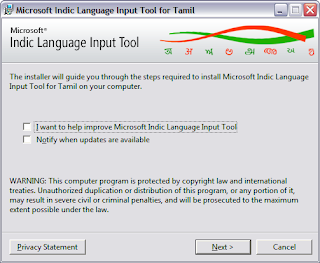
கீழே
உள்ளபடி இயங்குதளத்திற்கு ஏற்றவாறு மாற்றங்களை செய்து கொள்ளுங்கள்.
இப்போது டாஸ்க்பாரில் Language Tool bar வந்திருப்பதை காணலாம்.
Windows XP
Enabling Indic Language Support
Do the following to use Microsoft ILIT in any application, such as Microsoft Word:
If you do not see the language
bar in the task bar (at the bottom of the desktop) or floating on the
desktop please do the following:
Windows Vista
Using Microsoft Indic Language Input Tool ("ILIT")
Do the following to use Microsoft ILIT in any application, such as Microsoft Word:
If you do not see the language
bar in the task bar (at the bottom of the desktop) or floating on the
desktop please do the following:
Windows 7
Using Microsoft Indic Language Input Tool ("ILIT")
Do the following to use Microsoft ILIT in any application, such as Microsoft Word:
If you do not see the language
bar in the task bar (at the bottom of the desktop) or floating on the
desktop please do the following:
செய்வதற்கு எ-கலப்பை, குறள், அழகி, NHM Writer போன்ற பல கருவிகள்
இருந்தாலும், மைக்ரோசாஃப்ட் இயங்குதளம் அனைத்துக்கும் இசைவாக இல்லாமல்
அவ்வவ்ப்போது மக்கர் செய்வதுண்டு. சில சமயங்களில் வேர்டு தொகுப்பில் டைப்
செய்யும் போது கட்டம் கட்டமாக தோன்றுவதுண்டு. இந்த பிரச்சினைகள் இல்லாமல்
மைக்ரோசாப்டே வெளியிட்டிருக்கும் தமிழ் உள்ளீட்டுக்கருவியை பற்றி பார்க்கப்
போகிறோம்.
இந்த மென்பொருளை தரவிறக்க இங்கே
சுட்டவும். இந்த இணைப்பை கிளிக் செய்து பின் ஓப்பனாகும் வலைப்பக்கத்தில்
இருக்கும் install Desktop Version பட்டனை கிளிக் செய்து மென்பொருளை
தரவிறக்கி நிறுவிக்கொள்ளுங்கள்.

கீழே
உள்ளபடி இயங்குதளத்திற்கு ஏற்றவாறு மாற்றங்களை செய்து கொள்ளுங்கள்.
இப்போது டாஸ்க்பாரில் Language Tool bar வந்திருப்பதை காணலாம்.
Windows XP
Enabling Indic Language Support
- Click Start, click Control Panel, and then double-click Regional and Language Options.
- On the Languages tab, select the Install files for complex script and right-to-left languages (including Thai) check box.

- Click on Details.
- On the Advanced tab, select the Extend support of advanced text services to all programs check box.

- Click OK to dismiss the Text Services and Input Languages window.
- Click OK to dismiss the Regional and Language Options window.
You may be asked to insert the Windows XP installation media during this process.
A restart may be necessary to complete the process.
Do the following to use Microsoft ILIT in any application, such as Microsoft Word:
- Open the application in which you would like to enter Indic text.
- Change the language using the language bar, which typically appears in the taskbar as follows.

- The language bar will now show the current language.

- You can now start typing in English and whatever you type
automatically gets transliterated after a word-breaking
character like a space, comma, etc. is entered. Note that this
language setting is per application. You may have to repeat the steps
above for each application you want to use Microsoft ILIT in.
If you do not see the language
bar in the task bar (at the bottom of the desktop) or floating on the
desktop please do the following:
- Click Start, click Control Panel, and then double-click Regional and Language Options.
- On the Languages tab, under Text services and input languages, click Details.

- Under Preferences, click Language Bar.

- Select the Show the Language bar on the desktop check box.

Windows Vista
Using Microsoft Indic Language Input Tool ("ILIT")
Do the following to use Microsoft ILIT in any application, such as Microsoft Word:
- Open the application in which you would like to enter Indic text.
- Change the language using the language bar, which typically appears in the taskbar as follows.

- The language bar will now show the current language.

- You can now start typing in English and whatever you type
automatically gets transliterated after a word-breaking character like a
space, comma, etc. is entered. Note that this language setting is
per application. You may have to repeat the steps above for each
application you want to use Microsoft ILIT in.
If you do not see the language
bar in the task bar (at the bottom of the desktop) or floating on the
desktop please do the following:
- Click Start and go to Control Panel.
- Click Change keyboards or other input methods under Clock, Language and Region.
- On the Keyboards and Languages tab, click Change Keyboards.

- On the Language Bar tab, select the Floating on Desktop option.

Windows 7
Using Microsoft Indic Language Input Tool ("ILIT")
Do the following to use Microsoft ILIT in any application, such as Microsoft Word:
- Open the application in which you would like to enter Indic text.
- Change the language using the language bar, which typically appears in the taskbar as follows.

- The language bar will now show the current language.

- You can now start typing in English and whatever you type
automatically gets transliterated after a word-breaking character like a
space, comma, etc. is entered. Note that this language setting is
per application. You may have to repeat the steps above for each
application you want to use Microsoft ILIT in.
If you do not see the language
bar in the task bar (at the bottom of the desktop) or floating on the
desktop please do the following:
- Click Start and go to Control Panel.
- Click Change keyboards or other input methods under Clock, Language and Region.
- On the Keyboards and Languages tab, click Change Keyboards.

- On the Language Bar tab, select the Floating on Desktop option.

- ராஜா
 தலைமை நடத்துனர்
 - பதிவுகள் : 31337
இணைந்தது : 07/04/2009 -

ராஜா Tue Dec 28, 2010 10:36 am
- krishnaamma
 தலைமை நடத்துனர்
 - பதிவுகள் : 65836
இணைந்தது : 22/04/2010
krishnaamma Tue Dec 28, 2010 6:22 pm
Raja, I downloaded. when I try to install it it is asking me to put windos XP cd, in CD ROM. but you have not showed like that , can you please explain?

- ராஜாதலைமை நடத்துனர்
- பதிவுகள் : 31337
இணைந்தது : 07/04/2009 -
ராஜா Tue Dec 28, 2010 6:25 pm
ஆமாம் உங்களது கணினியில் லாங்குவேஜ் pack இன்ஸ்டால் செய்யபட்டு இருக்கவில்லையெனில் winxp cd கேட்கும்krishnaamma wrote:Raja, I downloaded. when I try to install it it is asking me to put windos XP cd, in CD ROM. but you have not showed like that , can you please explain?
 , இருந்தால் அதை cd ட்ரைவில் போடவும்.
- krishnaammaதலைமை நடத்துனர்
- பதிவுகள் : 65836
இணைந்தது : 22/04/2010
krishnaamma Tue Dec 28, 2010 6:28 pm
ஹோ, ஓகே ஓகே, நான் கிருஷ்ணா வை கேட்கிறேன். நன்றி ராஜா 
- ராஜாதலைமை நடத்துனர்
- பதிவுகள் : 31337
இணைந்தது : 07/04/2009 -
ராஜா Tue Dec 28, 2010 6:33 pm
krishnaamma wrote:ஹோ, ஓகே ஓகே, நான் கிருஷ்ணா வை கேட்கிறேன். நன்றி ராஜா
- krishnaammaதலைமை நடத்துனர்
- பதிவுகள் : 65836
இணைந்தது : 22/04/2010
krishnaamma Tue Dec 28, 2010 8:19 pm
நான் அந்த வேலயை முடித்துவிட்டேன் என்னால் இப்ப வோர்ட் இல் தமிழில் டைப் பண்ண முடிகிறது. ஆனால் இங்கு போல் எளிமயாக இல்ல. நன்றி ராஜா 
- Sponsored content
Sponsored content


Similar topics
மறுமொழி எழுத நீங்கள் உறுப்பினராக இருக்க வேண்டும்..
ஈகரையில் புதிய பதிவு எழுத அல்லது மறுமொழியிட உறுப்பினராக இணைந்திருத்தல் அவசியம்
Page 1 of 1
|
|
|